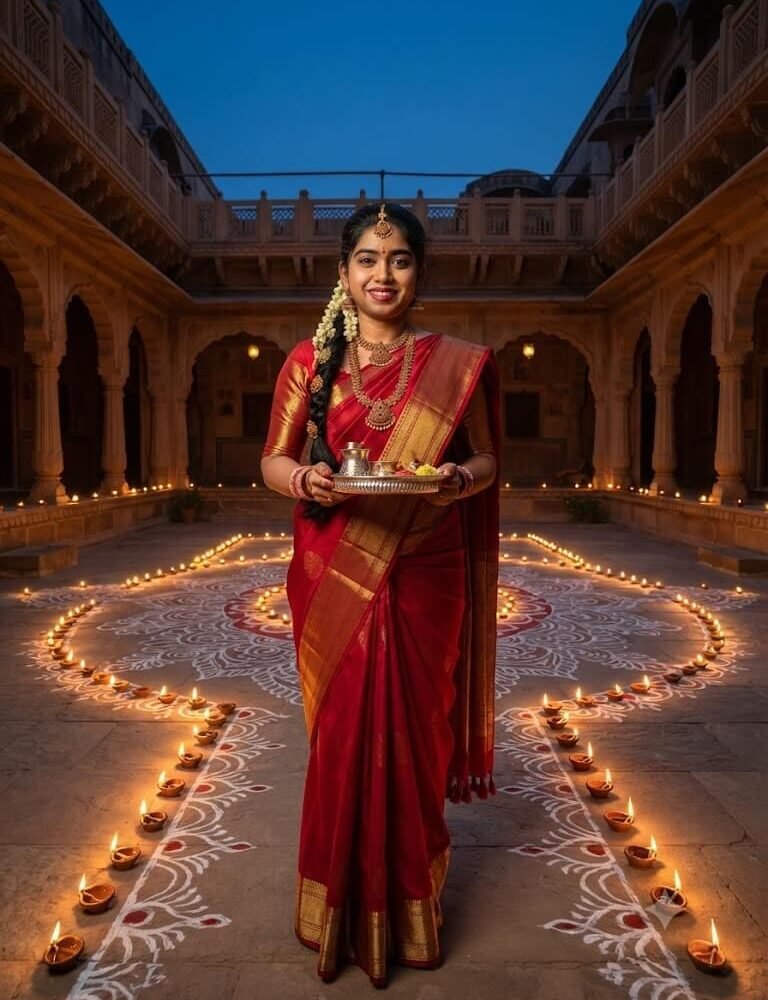
An ultra-realistic 8K cinematic heritage portrait of the woman from the uploaded photo. Her facial identity, face structure, smile, eye color, and skin complexion must remain 100% identical to the reference photo. She is standing gracefully in the sprawling central courtyard of an authentic 19th-century Rajasthani haveli at the magical hour of twilight. The stone courtyard floor is adorned with an expansive, hand-drawn white rice-flour and red vermilion alpana, outlined by hundreds of flickering earthen diyas. She is wearing a royal crimson-red Kanjeevaram silk saree with heavy gold zari borders, accompanied by antique South Indian temple jewelry and a floral hair braid. She holds an ornate sterling silver puja thali. Soft evening blue-hour sky contrasted against warm golden diya glow, volumetric architectural lighting, 35mm cinematic lens, hyper-realistic details.
About This Prompt & Style Guide
Step back into an era of grand zamindari elegance with this vintage royal heritage courtyard Diwali AI photo prompt. Transporting your likeness into a majestic 19th-century Indian haveli during twilight, this prompt captures the awe of dusk when hundreds of earthen lamps illuminate grand sandstone pillars. The courtyard floor features an elaborate hand-painted white chalk and vermilion alpana. Wearing a regal crimson Kanjeevaram silk saree with pure gold zari borders and heritage temple jewels, you hold a gleaming silver puja thali. With realistic depth of field, natural twilight ambiance, and strict facial identity retention, this prompt crafts a museum-worthy, high-resolution visual narrative.