Prompt Specifications
Compatible AI Tools:
Google Gemini / ChatGPT-4o
Aspect Ratio:
3:4
Pro Tip for Realistic Results:
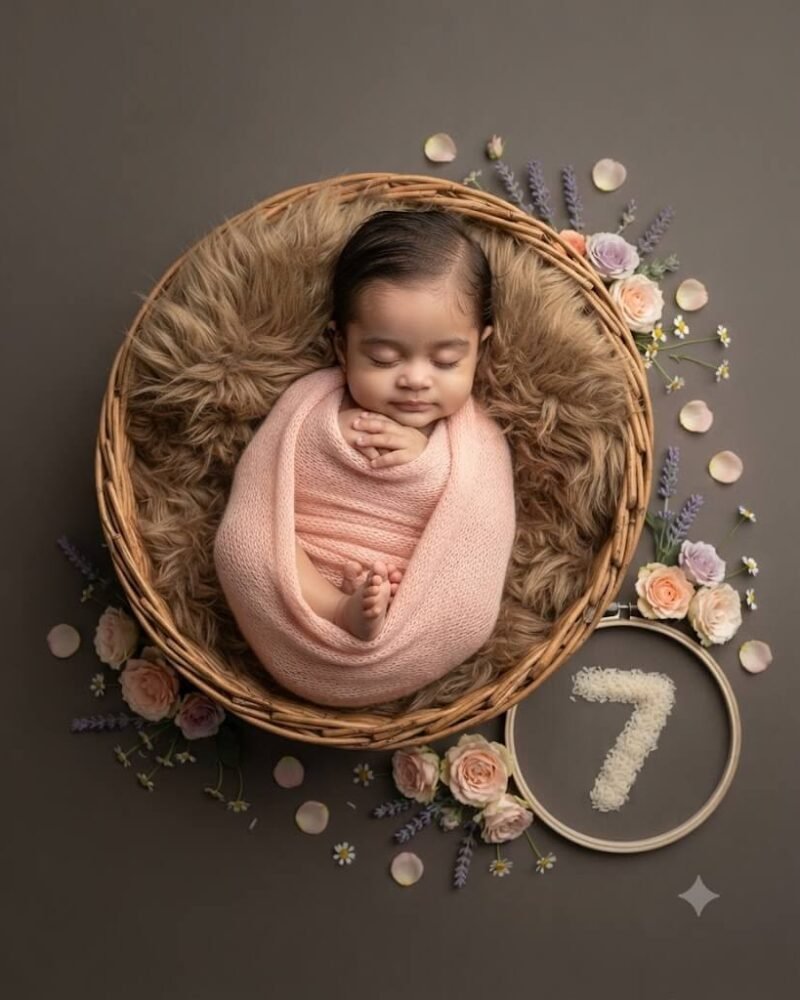
The rice grain number adds a highly unique, organic touch to this editorial-style portrait.
Exact AI Prompt Text
1-Click Copy
Ultra-high resolution photorealistic fine-art portrait using the uploaded image strictly for exact facial identity and hair feature preservation. A peaceful 7-month-old baby sleeping gently inside a cozy round woven wicker basket lined with warm brown faux-fur. The baby is wrapped in a soft pastel peach-pink knitted swaddle. Surrounding the basket are delicate pastel-colored flowers and scattered rose petals on a clean matte dark-neutral background. A distinct circular element with the number '7' made from white rice grains rests gracefully nearby. Soft diffused studio lighting, editorial style, crisp details, natural skin texture with no over-smoothing, 4:5 portrait aspect ratio.
3-Step Simple Guide
How To Use Lensifys
You don't need to be a prompt engineer. Follow three easy steps to create realistic AI photos.
1
Copy Any Prompt
Browse through thousands of viral prompts on Lensifys. Click the "Copy Prompt" button on any card to copy with 1-click.
2
Open Gemini or ChatGPT
Head to Google Gemini (gemini.google.com) or ChatGPT. Upload your front-facing reference photo into the chat.
3
Paste & Generate
Paste the copied prompt, press send, and watch the AI tool generate an ultra-realistic, high-resolution portrait ready for Instagram or DP!