Viral 🔥

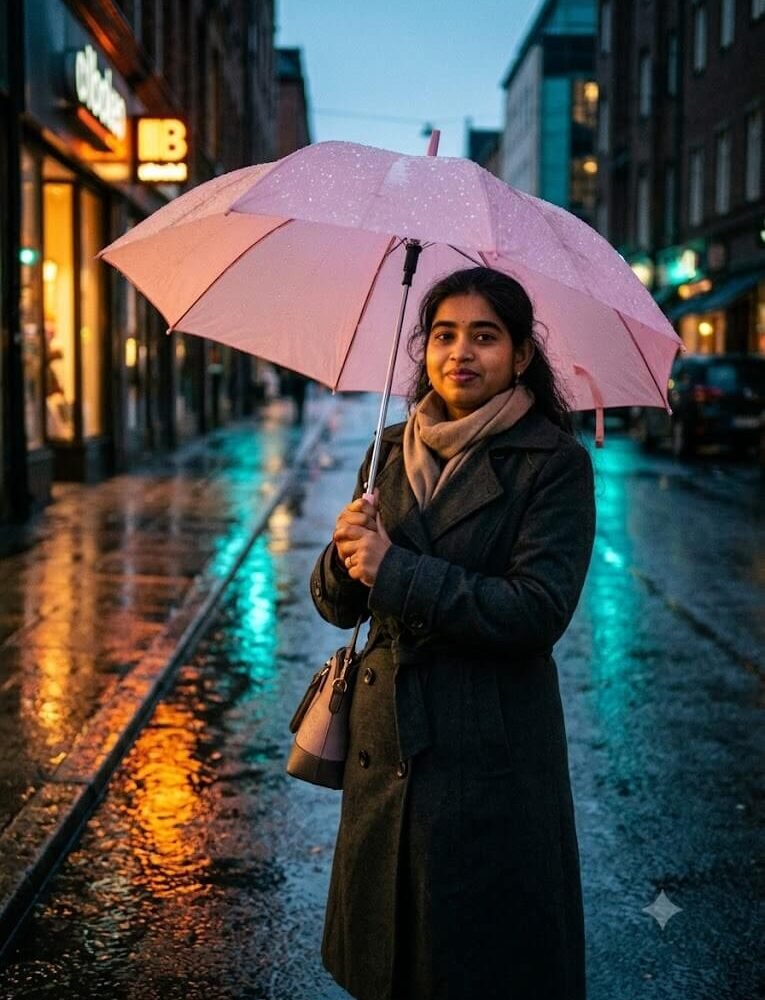
Rainy Neon Street Pastel Umbrella Glow

Google Gemini / ChatGPT 3:4
Rainy Neon Street Pastel Umbrella Glow
Prompt Specifications
Compatible AI Tools: Google Gemini / ChatGPT
Aspect Ratio: 3:4
Category:
Pro Tip for Realistic Results:

Add "delicate water droplet refraction" for ultra-crisp rain droplet textures.

Exact AI Prompt Text

1-Click Copy
An evocative, cinematic mood photograph of a young woman carrying a translucent soft pink umbrella on a rain-washed asphalt avenue at dusk. Sharp realistic raindrops clinging to the canopy, warm neon amber and turquoise storefront lights reflected in wet pavement puddles. Gentle ambient glow under the umbrella accentuating natural facial details. Dressed in a dark charcoal trench coat with a cozy cashmere scarf, 35mm shallow depth of field, rich color grading --ar 3:4
About This Prompt & Style Guide

An evocative, cinematic mood photograph of a young woman carrying a translucent soft pink umbrella on a rain-washed asphalt avenue at dusk. Sharp realistic raindrops clinging to the canopy, warm neon amber and turquoise storefront lights reflected in wet pavement puddles. Gentle ambient glow under the umbrella accentuating natural facial details. Dressed in a dark charcoal trench coat with a cozy cashmere scarf, 35mm shallow depth of field, rich color grading –ar 3:4

Tags: #
3-Step Simple Guide

How To Use Lensifys

You don't need to be a prompt engineer. Follow three easy steps to create realistic AI photos.

1

Copy Any Prompt

Browse through thousands of viral prompts on Lensifys. Click the "Copy Prompt" button on any card to copy with 1-click.

2

Open Gemini or ChatGPT

Head to Google Gemini (gemini.google.com) or ChatGPT. Upload your front-facing reference photo into the chat.

3

Paste & Generate

Paste the copied prompt, press send, and watch the AI tool generate an ultra-realistic, high-resolution portrait ready for Instagram or DP!

Leave a Reply

Your email address will not be published. Required fields are marked *